
SOPs for schools
Write the procedure once. Zeroskip runs it every time.
A standard operating procedure (SOP) says who does what, in what order and by when. Zeroskip turns each school SOP into tracked steps, so the procedure is followed even on a busy day.
Example
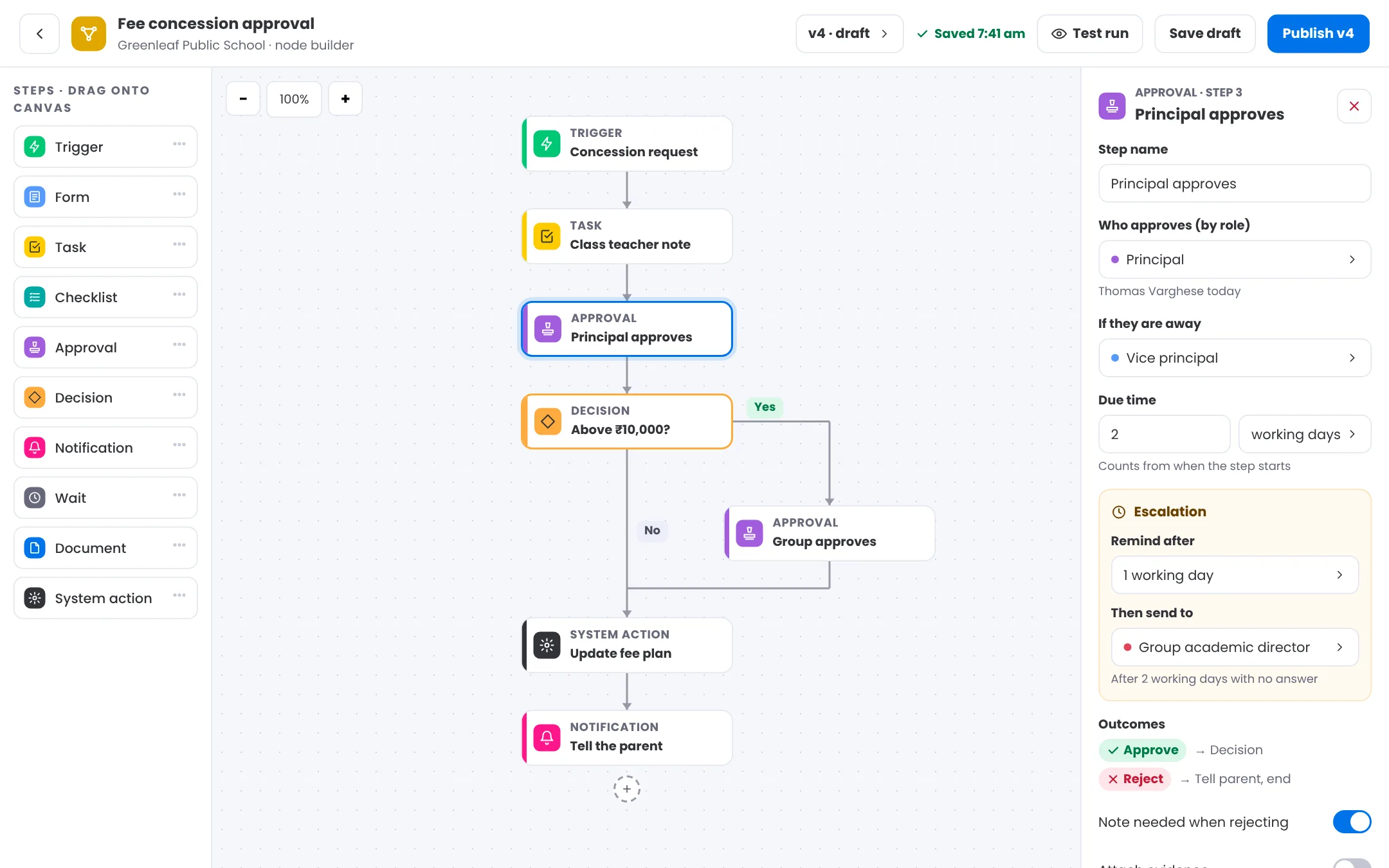
A fee concession, from request to updated fee plan
Seven steps, four roles, one record. Nobody has to remember who is next.
- TriggerConcession requestParent or office
- TaskClass teacher noteClass teacher · 1 day
- ApprovalPrincipal approvesPrincipal · 2 days
- DecisionAbove the limit?Set by your school
- ApprovalGroup approvesGroup finance
- System actionUpdate fee planDone by Zeroskip
- NotificationTell the parentApp and WhatsApp
The node builder
Ten kinds of step cover almost any school procedure
Drag steps onto a canvas and join them. No flowchart training needed: start from a starter SOP and change the roles and due times.
- Trigger
What starts the SOP: a request, a form, a date or an event such as a long absence.
- Form
Collects the details needed, the same way every time.
- Task
One job for one role, with a due time.
- Checklist
Several items to tick before the step can close.
- Approval
Approve or reject with a note. A stand-in covers when someone is away.
- Decision
Sends the case down a different path by a rule.
- Notification
Tells a parent or a staff member by app, WhatsApp or SMS.
- Wait
Pauses for a set time or until something happens.
- Document
Makes a letter or certificate from a template.
- System action
Zeroskip makes the change itself, such as updating a fee plan.
Run monitor
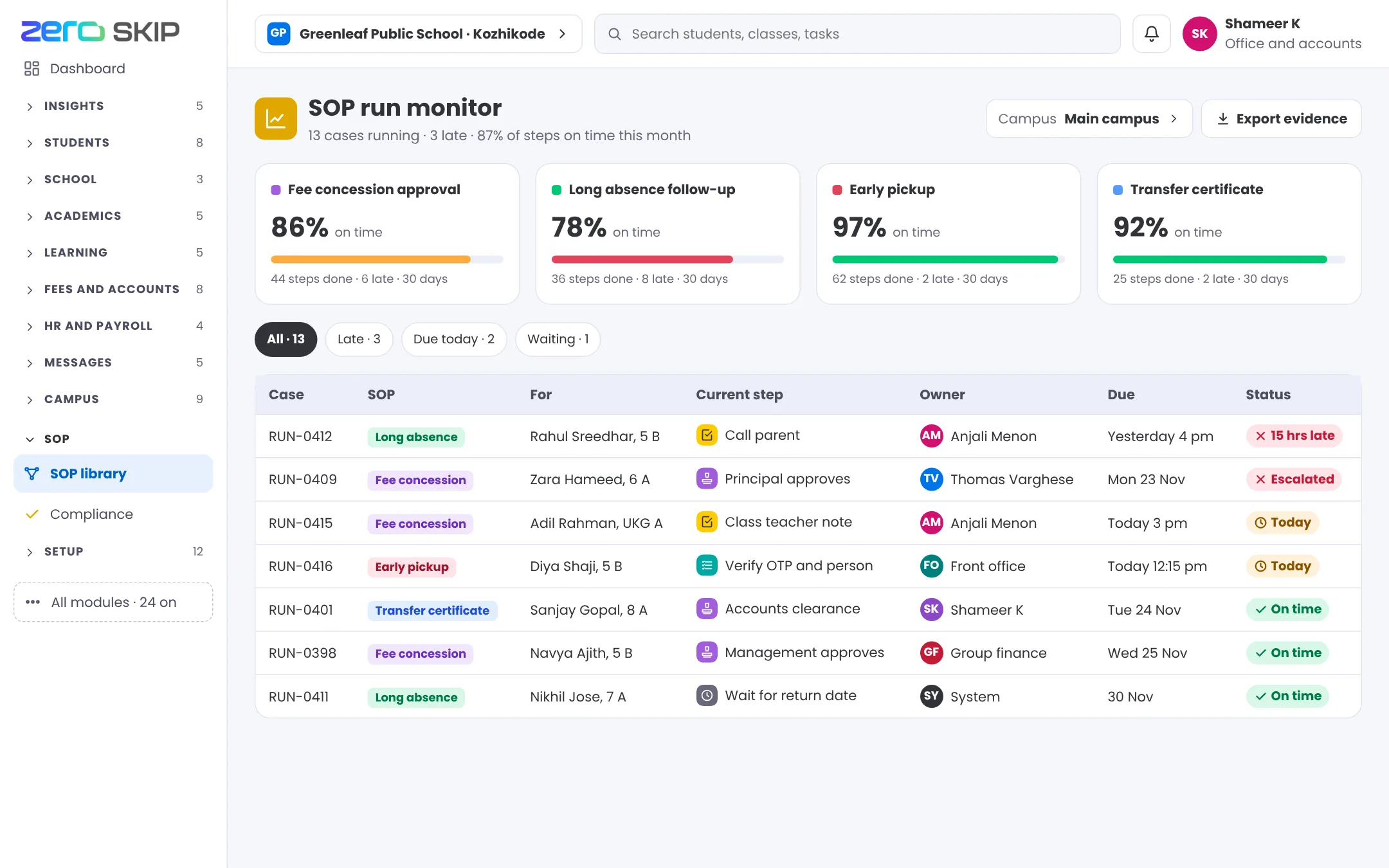
See what is late, and who has it
Every running case shows its current step, its owner and its due time. Nothing waits in a drawer.
- On-time rate for each SOP
- Late steps remind the owner, then go to the next person by role
- A stand-in takes over when someone is away
- Evidence export for audits and inspections
Starter SOPs
Five procedures ready on day one
Each one is a working SOP. Rename the roles, set your due times and publish.
Fee concession approval
Request, class teacher note, approvals by amount, fee plan updated, parent told.
Long absence follow-up
A set number of absent days starts calls, notes and a letter if needed.
Early pickup
The front office checks who is collecting, the teacher releases, the gate records.
Transfer certificate
Request, dues and clearance checks, signature, certificate issued.
Lost property
Item logged, class told, claimed with a signature or cleared at term end.
The five starter SOPs come with Zeroskip. The node builder for designing your own SOPs is an add-on. See pricing
FAQ
Questions about school SOPs
What is an SOP in a school?
An SOP (standard operating procedure) is a written set of steps for a job that repeats, such as approving a fee concession or releasing a child early. It names who does each step and by when.
Do we need to know flowcharts to use the builder?
No. Start from a starter SOP, change the names of roles and the due times, and publish. You can add steps later.
Who can change an SOP?
Only the roles you allow. Each published change is a new version, so you can see what the procedure said on any date.
What counts as evidence?
For each step Zeroskip keeps who did it, when, any note or file attached and whether it was on time. You can export this by SOP and by date.

Bring one of your own procedures to the demo
Send us one SOP you already follow. We will build it in Zeroskip and show you a case running through it.
Or call [YOUR PHONE] · WhatsApp [YOUR WHATSAPP]